App Binary OTA Update
This tutorial walks you through building and updating an IoT application binary running on a fleet of IoT devices, using the SocketXP OTA update feature end-to-end: from building the artifact to uploading it and deploying it on your devices.
Before you start, make sure you have downloaded and installed the SocketXP agent on your IoT devices and completed the Getting Started guide.
Sample App
We'll use a simple C program to demonstrate the OTA update workflow. The app prints "Hello, OTA update!" every 10 minutes and runs as a Linux systemd service on the device.
Note
We're using C for this example, but the app can be written in any language, such as Java, C++, Go, Python or JavaScript.
/*
 * To build: gcc myapp.c -o myapp
 * To run: ./myapp
 * Output: "Hello, OTA update!"
 */

#include <stdio.h>
#include <unistd.h>

int main() {
    while (1) {
        printf("Hello, OTA update!\n");
        fflush(stdout); // Ensure immediate output
        sleep(600); // in seconds
    }
    return 0;
}
The C program and build scripts used in this tutorial are available in our official GitHub repository.
Build the App Binary
Clone the repository:
For this example, we'll use the app folder:
~/ota-update-build-artifacts$ cd app
~/ota-update-build-artifacts/app$ ls
make_artifact.sh  myapp/  update.sh
The app folder contains:
- A
myappdirectory containing the app source (myapp.c) and aMakefileto build the binary. - An
update.shshell script — the workflow script that runs on the target device and updates the app binary. - A
make_artifact.shshell script — packages the binary and workflow script into atar.gzartifact.
Create a New Version of the App
Edit myapp.c to print "Hello, OTA update! Version 1.0.0" — we'll call this version 1.0.0 of the app.
/*
 * To build: gcc myapp.c -o myapp
 * To run: ./myapp
 * Output: "Hello, OTA update!"
 */

#include <stdio.h>
#include <unistd.h>

int main() {
    while (1) {
        printf("Hello, OTA update! Version 1.0.0\n");
        fflush(stdout); // Ensure immediate output
        sleep(600); // in seconds
    }
    return 0;
}
Compile and build the app binary:
~/ota-update-build-artifacts/app$ cd myapp
$ make myapp
gcc myapp.c -o myapp
$ ls
makefile  myapp  myapp.c
Now, create a tar.gz style artifact using it.
Why a tar.gz archive?
SocketXP OTA update expects the artifact to be uploaded as a tar.gz archive file containing the app binary and the workflow script update.sh. When the artifact is downloaded to the target device, the SocketXP agent unzips and extracts the tar.gz file contents into the /tmp directory, then starts executing the update.sh workflow script contained in the myapp_1.0.0 folder.
Go back to the app's parent directory and run make_artifact.sh:
~/ota-update-build-artifacts/app/myapp$ cd ..
~/ota-update-build-artifacts/app$ sh make_artifact.sh
  myapp_1.0.0
  myapp_1.0.0/myapp
  myapp_1.0.0/update.sh
~/ota-update-build-artifacts/app$ ls
make_artifact.sh  myapp/  myapp_1.0.0.tar.gz  update.sh
Verify the contents of the tar.gz file:
~/ota-update-build-artifacts/app$ tar -tf myapp_1.0.0.tar.gz
myapp_1.0.0/
myapp_1.0.0/myapp
myapp_1.0.0/update.sh
Workflow Script - update.sh
The OTA update workflow script contains all the instructions required to update myapp running on the IoT devices.
#!/bin/bash

#================================================
# MyApp Update Workflow Script - Example #1
#================================================

# stop the app running as systemd service
systemctl stop myapp

# backup the existing app
mv /usr/bin/myapp /usr/bin/myapp.bkup

# update the new binary
mv myapp /usr/bin/myapp

systemctl start myapp

# verify the app is working fine
service_name="myapp"
if systemctl --quiet is-active "$service_name"; then
  echo "$service_name is running."
  # update success
  # clean up the backup and exit
  rm -f /usr/bin/myapp.bkup
else
  echo "$service_name is not running."
  # update failed
  # restore from the backup
  mv /usr/bin/myapp.bkup /usr/bin/myapp
  # start the previous working version
  systemctl start myapp
fi
What the script does:
- Stops the
myappservice running in the background (assumption) - Creates a backup of the
myappbinary already running on the device - Copies the new version of
myappto the/usr/bindirectory - Starts the
myappservice, which kicks off the new version of the app binary - Verifies the service is running fine. If the app fails to run properly after the update, the script restores the previous working version from the backup and starts the app service.
- If the app runs fine after the update, it deletes the backup files and exits.
Learn more about writing your own workflow script in How to create an OTA Update Workflow Script.
Upload the Artifact
Log in to your SocketXP account and go to the OTA Update page. In the Artifacts table, click Upload new artifact.
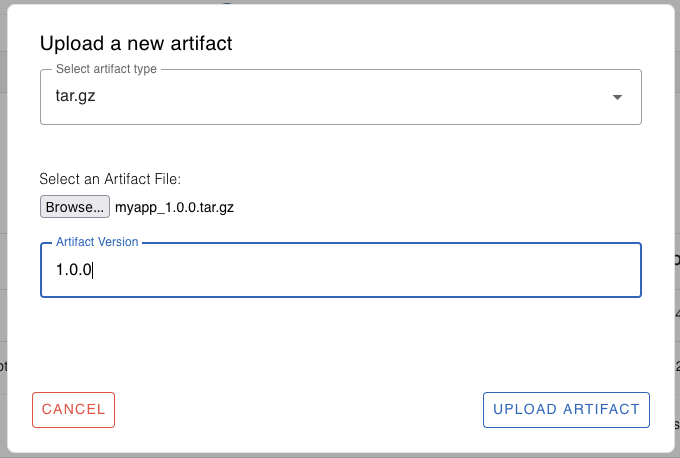
Browse and select the myapp_1.0.0.tar.gz file you just built. Specify the artifact version, 1.0.0 in this example. Click Upload to upload the artifact to the cloud registry. You'll see a message saying "File uploaded successfully".
Deploy the Artifact
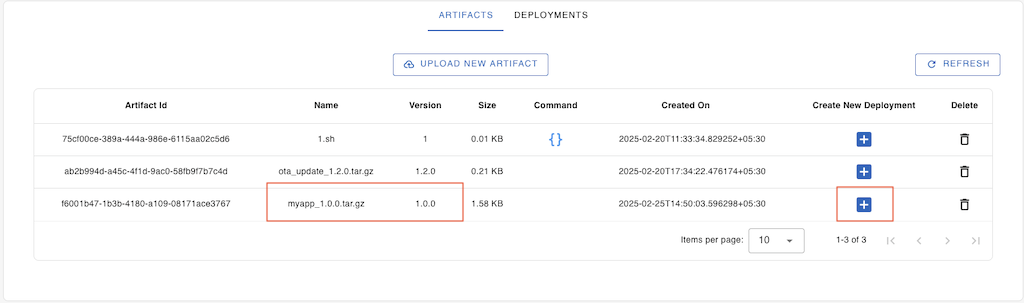
From the Artifacts table, select the artifact you just uploaded.
Note
If you don't see your artifact yet, click Refresh to reload the table data.
Click the + icon next to the artifact to create a new deployment.
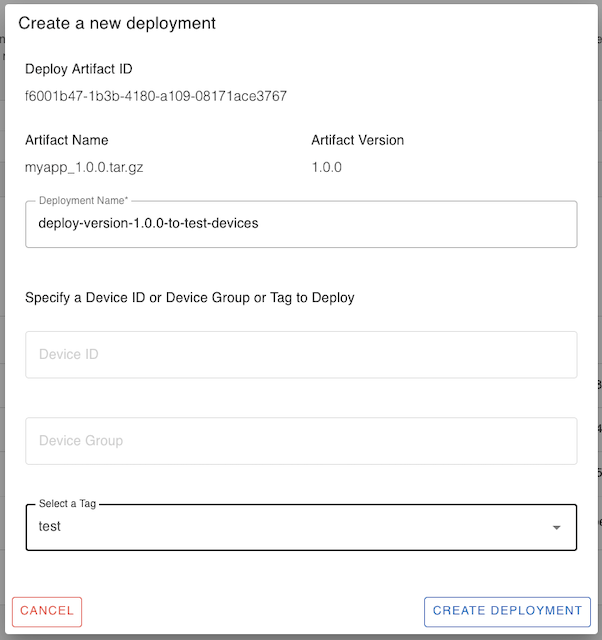
Give the deployment a name, for example, deploy-version-1.0.0-to-test-devices. Specify the target device ID, device group, or tag to deploy the artifact on.
Note
You can deploy the artifact on a single device ID, device group, or device tag. To deploy on more than one group or tag, repeat the "Create New Deployment" process for each.
Click Create Deployment. Go to the Deployments tab and click Refresh.
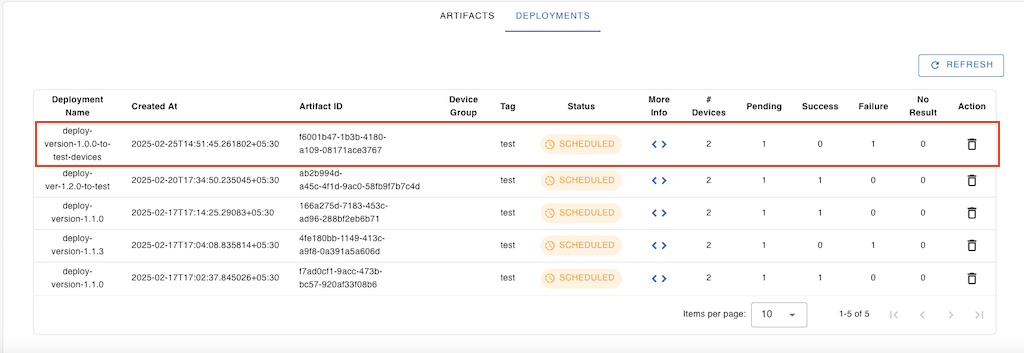
Select the deployment to see its progress. Click More Info < > to monitor the progress on each target device in the group or tag. Click Refresh to view the progress.
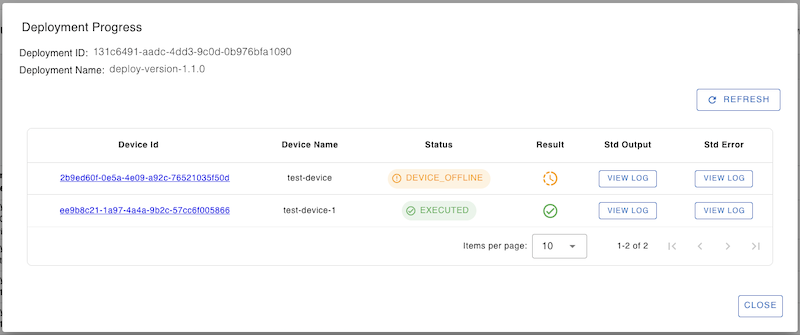
You can check the stdout and stderr logs generated by the update process by clicking the view log buttons.
Verify the Update
Log in to one of the devices to check if the myapp deployment was successful:
$ systemctl status myapp
● myapp.service - myapp service
     Loaded: loaded (/etc/systemd/system/myapp.service; enabled; vendor preset: enabled)
     Active: active (running) since Tue 2025-02-25 00:25:47 UTC; 2 seconds ago
   Main PID: 486462 (myapp)
      Tasks: 1 (limit: 3301)
     Memory: 152.0K
        CPU: 291ms
     CGroup: /system.slice/myapp.service
             └─486462 /usr/bin/myapp

Feb 25 00:25:47 ubuntu myapp[486462]: Hello, OTA update! Version 1.0.0
You can also view the app logs using journalctl:
$ journalctl -u myapp -n 10
Feb 24 02:00:52 ubuntu myapp[486462]: Hello, OTA update!
Feb 25 00:25:47 ubuntu myapp[486462]: Hello, OTA update! Version 1.0.0
You have successfully updated a native app binary on remote IoT devices using SocketXP OTA update.
Next Steps
Now that you've learned how to publish an app binary as an OTA update, check out the other artifact types: